
Editor’s note: This report was authored by Tristano Di Liberto and Austin Ritchie
This is external threat intelligence from the ReliaQuest Threat Research team. The findings describe threats, vulnerabilities, and attacker activity affecting third parties and the broader threat landscape—not ReliaQuest’s own environment. Nothing in this report should be read as a vulnerability in ReliaQuest’s systems or data.
This is not a Microsoft software vulnerability, but a limitation in the control’s scope. Microsoft was made aware through multiple attempts of this security control bypass for RejectDirectSend, a Microsoft 365 control in Exchange Online intended to block unauthenticated Direct Send emails from an organization’s domain.
Key Points
ReliaQuest observed that an empty Simple Mail Transfer Protocol (SMTP) envelope sender can bypass RejectDirectSend, the Microsoft 365 control meant to block unauthenticated Direct Send mail. The message still carries an internal-looking address, increasing the likelihood that spearphishing reaches the recipient.
Across multiple cases we investigated, attackers repeatedly used self-addressed messages and familiar business lures to target leadership and business-facing users.
The technique requires only one empty field—no credentials, no registered lookalike domain, and no dedicated sending infrastructure—so organizations should expect continued use.
Testing showed that IP-restricted inbound connectors blocked every Direct Send attempt regardless of envelope sender, so organizations already limiting inbound mail to approved source IPs aren’t exposed. Use these connectors, tightly control filtering exceptions, and monitor for empty envelope senders paired with internal addresses.
ReliaQuest observed that an empty Simple Mail Transfer Protocol (SMTP) envelope sender can bypass RejectDirectSend, a Microsoft 365 control in Exchange Online intended to block unauthenticated Direct Send emails from an organization’s domain. An external sender can omit the envelope domain while retaining an internal-looking address, making phishing messages more likely to be trusted.
Direct Send allows devices and applications to send email to recipients in the same Microsoft 365 tenant without authentication. RejectDirectSend evaluates the domain in the SMTP envelope sender, but an empty value means there’s no domain to check. In testing, changing only this field caused Microsoft 365 to accept and queue a message it otherwise rejected.
ReliaQuest identified numerous instances of this empty-envelope pattern over the past year, frequently used against executives, managers, and business-facing roles. In one case, a message failed every sender authentication check and was classified as high-confidence phishing but still reached the inbox because the spoofed executive address was listed as an allowed sender. Defenders should therefore treat filtering exceptions as high-risk trust decisions, particularly when they cover privileged or frequently impersonated users.
In this spotlight, we:
Explain how the bypass works and how we validated it against a tenant with RejectDirectSend enabled.
Examine the pattern of ongoing examples, including delivery outcomes, phishing themes, and targeted users.
Provide detection guidance, recommendations, and an assessment of how the technique is likely to develop.
Testing Confirms the RejectDirectSend Bypass
Our testing confirmed that an empty SMTP envelope sender can bypass RejectDirectSend, allowing Microsoft 365 to accept an unauthenticated message whose visible From header uses an internal-looking address. Organizations shouldn’t rely on RejectDirectSend alone to prevent Direct Send impersonation. Attackers can exploit this gap to send messages that appear to come from trusted internal users or business functions, raising the risk of credential theft, fraudulent payments, malware delivery, and unauthorized access.
Testing and Reproducing the Bypass
We reproduced the behavior in a controlled test environment using a ReliaQuest-owned Microsoft 365 tenant. Before testing, we confirmed RejectDirectSend was enabled. Both messages were sent without credentials directly to the tenant’s mail host and displayed the same internal IT support address in the visible From header. The messages used the same header fields, sending host, recipient, and SMTP session details. Apart from the envelope sender under test, the only other difference was the subject and body labels.
We then used the following Python script to compare how Microsoft 365 handled two envelope sender conditions. The baseline message used an address from the tenant’s accepted domain, while the second used an empty envelope sender—also known as a null reverse path.
|
The script’s send() function passes the MAIL FROM value as the first argument to Python’s sendmail() method. Supplying an empty string causes Python to issue MAIL FROM:<>, letting us test the baseline and empty envelope conditions against the same host and recipient. Neither test required a registered lookalike domain or a compromised internal host, showing that an attacker would need little additional infrastructure to use the technique.
Test | Envelope Sender | Visible From Header | Result |
|---|---|---|---|
Baseline | attacker@VICTIM_DOMAIN | IT Support <it-support@VICTIM_DOMAIN> | Rejected |
Empty Sender | MAIL FROM:<> | IT Support <it-support@VICTIM_DOMAIN> | Accepted and queued |
Microsoft 365 rejected the baseline message because its envelope sender used the tenant’s accepted domain. However, it accepted and queued the message with MAIL FROM:<>. The visible From header remained unchanged, so the message still displayed an internal IT support address to the recipient.
The result shows that an empty envelope sender avoids RejectDirectSend’s documented rejection condition.[i] However, it doesn’t guarantee inbox delivery, as downstream controls can still block the message or route it to Junk Email. Those controls operate independently and produce different outcomes depending on the message content, tenant configuration, and filtering exceptions.
Enabling RejectDirectSend doesn’t fully resolve the risk of unauthenticated senders impersonating internal users. Defenders should supplement it with restricted inbound connectors, tightly controlled filtering exceptions, sender-authentication controls, and monitoring for messages that combine an empty envelope sender with an internal From address.
Acceptance, Filtering, and Connector Controls
The test results show that RejectDirectSend enforcement, mailbox placement, and connector controls operate independently. Success at one stage isn’t evidence that another worked as intended.
The baseline transaction used an accepted-domain address as the envelope sender. Microsoft 365 rejected it, preventing delivery:
|
The empty sender transaction didn’t get the same rejection—Microsoft 365 accepted the recipient and queued the message:
|
|
Microsoft 365 accepted the message with the empty envelope sender and delivered it to the recipient’s Junk Email folder. The headers classified the message as anonymous, incoming mail. No sender authentication check passed, and Microsoft 365 assigned the message the maximum Spam Confidence Level (SCL) of 9. The Domain-based Message Authentication, Reporting, and Conformance (DMARC) result recorded action=oreject, meaning Microsoft 365 overrode the sending domain’s reject policy rather than rejecting the message.
However, delivery to Junk Email doesn’t mean RejectDirectSend worked. The message had already bypassed the control and entered the tenant’s mail system before downstream antispam filtering assigned the disposition. The cloud hosting source, unresolvable HELO name, and failed sender authentication likely contributed to the SCL 9 rating. Because these indicators depend on the sender’s infrastructure and message content, another message using the same bypass could get a different verdict and reach the inbox.
Organizations that route inbound mail through a secure email gateway can use IP-restricted inbound connectors to limit Direct Send to approved devices and applications. During testing, an IP-restricted connector blocked every Direct Send attempt regardless of the envelope sender and had to be temporarily disabled to isolate RejectDirectSend. Because the connector evaluated the source IP rather than the envelope sender, the empty-envelope bypass didn’t affect it in this test.
Why Direct Send Remains Exposed
Organizations often use Direct Send so printers, scanners, and applications that can’t securely store credentials can send scanned documents, alerts, reports, and other automated notifications within the same Microsoft 365 tenant. Empty envelope senders are also a legitimate part of SMTP, commonly used for non-delivery reports. Blocking all messages that use MAIL FROM:<> could therefore disrupt legitimate mail flow, making a blanket restriction impractical.
Empty Sender Phishing Repeatedly Reaches Inboxes
ReliaQuest investigated multiple phishing cases between September 2025 and August 2026 that used an empty envelope sender across multiple organizations. RejectDirectSend was confirmed enabled in one of the tenants; enablement couldn’t be determined for the remainder, so these examples establish that the empty-envelope pattern is in active use rather than an exact number of confirmed bypasses. Microsoft 365 generally recognized the messages as unauthenticated phishing, but filtering exceptions and trusted internal mail paths still let most of them reach user inboxes. The continued use of an empty envelope sender across unrelated organizations indicates that this behavior is part of routine phishing activity rather than isolated testing of the control or a coordinated campaign. In our investigation, we saw that attackers frequently targeted leadership and business-facing roles, likely to increase the chances of fraudulent payments, unauthorized access, or disclosure of sensitive information.
File-Sharing and Payment Requests Are the Most Common Lures
The delivered emails used familiar business themes rather than technically sophisticated lures. Document and file-sharing notifications were the most common, followed by payment and remittance requests, procurement invitations, loan and investment offers, and a meeting invitation.
These themes blend into routine workflows and give recipients a plausible reason to open a document, follow a link, or act on a financial request. Multiple cases used SVG (graphics file type) attachments presented as voicemail recordings, combining a familiar notification theme with a browser-rendered file format that security products may handle inconsistently.
The voicemail and fax notification themes match those reported publicly in Direct Send phishing activity since May 2025, in which researchers documented the same self-addressed pattern as a behavioral indicator but didn’t mention the envelope sender.
Leadership and Finance Roles Are Primary Targets
Spoofing a recipient’s trusted email address gives attackers an advantage, as messages from familiar senders draw less scrutiny and may already be covered by existing trust rules. Attackers concentrated on roles with organizational authority or regular exposure to external business requests, probably to make the lures more credible and increase the chance a recipient opens the email.
The recipient groupings broke down as follows:
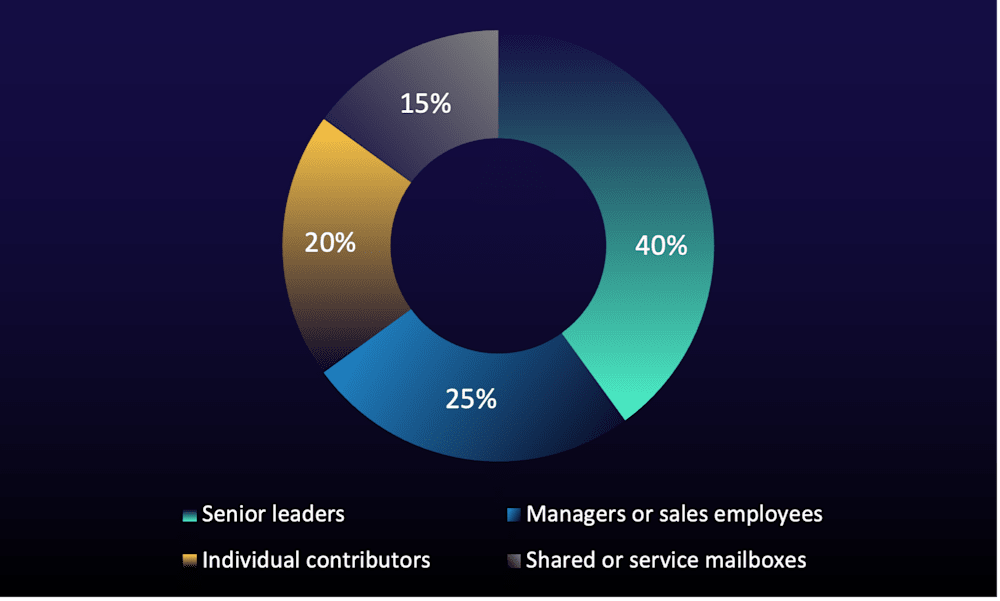
ReliaQuest assesses with moderate confidence that attackers in the cases we investigated favored recipients who routinely process invoices, bids, payment instructions, and externally shared documents. Attackers likely target these users because their authority and routine responsibilities make financial and document-sharing lures more credible, and a successful compromise can enable fraudulent payments, sensitive data theft, or further access.
Procurement and customer-facing mailboxes are also attractive targets because they routinely receive unfamiliar external messages that multiple users may need to act on. Permissive allow rules for these identities can further increase the risk by giving attackers a repeatable way to deliver phishing under a trusted internal address.
Step Up Your Defenses Against the RejectDirectSend Bypass
ReliaQuest’s Approach
ReliaQuest GreyMatter, an agentic AI security operations platform, helps security teams spot the activity detailed in this report while it’s still visible in mail-flow telemetry, rather than after a user has already acted on the spearphishing email.
GreyMatter Transit surfaces mail-flow and message-trace indicators in transit, including an empty envelope sender, an internal From address, and failed authentication; this helps security teams isolate the bypass pattern from normal email traffic.
GreyMatter Agentic AI correlates the signals that defined the bypass: empty envelope sender, internal impersonation, authentication failures, phishing verdict, and delivery outcome. That correlation explains why otherwise similar messages were rejected, sent to Junk Email, or delivered.
ReliaQuest Detection Rules alert on internal sender impersonation that bypasses preventive email controls, reducing the likelihood that a phishing email leads to credential theft, malware execution, or broader account compromise.
Organizations can cut mean time to contain (MTTC) from hours to minutes by deploying detection rules alongside the following GreyMatter Automated Response Playbooks:
Soft Delete Email: Removes matching phishing messages from the affected mailboxes.
Block IP: Prevents communication from known malicious infrastructure.
Reset Password + Terminate Sessions: Contains accounts when user interaction or compromise is confirmed.
Your Action Plan
Because RejectDirectSend doesn’t fully prevent abuse of empty envelope senders, organizations should layer mail-flow controls, remove unnecessary filtering exceptions, and monitor for indicators of the bypass.
ReliaQuest recommends the following actions:
Allow Direct Send Only from Approved IP Addresses: Configure an IP-restricted inbound connector permitting only the inventoried devices and applications that require unauthenticated sending. Keep RejectDirectSend enabled but don’t treat the internal spoofing risk as “closed” on the strength of that control alone.
Remove Unnecessary Mail-Filtering Exceptions: Review every setting that can override a filtering verdict, including allowed senders, allowed sender domains, Tenant Allow and Block List entries, mail flow rules that set spam confidence, and user-level safe senders. Record whether each entry covers one address or a whole domain, identify any that name an executive or manager, and remove those you can’t justify.
Proactively Identify Impersonation of Internal Users: Hunt for an empty envelope sender paired with a header
Fromaddress in one of your accepted domains, and alert on any message that failed Sender Policy Framework (SPF), DomainKeys Identified Mail (DKIM), or DMARC checks but was delivered under an override. Bounce messages also use empty envelope senders, so the internal headerFromaddress is what sets this activity apart.
Key Takeaways and What’s Next
Over the next 6–12 months, ReliaQuest assesses with high confidence that attackers will continue using empty envelope senders because the technique is simple to implement and has already appeared repeatedly across unrelated organizations. The technique requires only omitting the envelope sender, which sidesteps the domain-based rejection RejectDirectSend relies on.
Bypassing RejectDirectSend doesn’t guarantee inbox placement. Attackers seeking more reliable delivery will likely move to less suspicious infrastructure and refine message content to reduce spam indicators.
Our investigations show that recipients were exposed, but they don’t on their own confirm follow-on compromise. However, any phishing message that reaches an inbox creates opportunities for credential theft, malware execution, financial fraud, and account compromise. Email administrators and security teams should test other Exchange Online and third-party controls that depend on the envelope sender, validate filtering exceptions and trusted mail paths, and monitor for empty envelope senders paired with internal From addresses.