AI As a Multiplier
One of AI's clearest roles in cyber incidents is helping attackers do more with less: scale content, localize lures, and spin up infrastructure faster.
AI's facility widens the pool of reachable victims and lowers the barrier to entry. Less capable actors can operate more effectively, while more mature ones can move faster and at greater volume. Campaigns that once took sustained effort can now be launched, adjusted, and repeated faster than manual review and response can keep up. That collapses the window between lure and credential theft, leaving organizations substantially more at risk of breach.
AI-Scaled Phishing Infrastructure
One of the clearest examples of AI as a multiplier appeared in a recent sector-wide phishing campaign.
Threat actors generated thousands of phishing pages impersonating well-known booking platforms and individual businesses. In the HTML, we identified several clues consistent with an AI-assisted workflow that likely contributed to both the infrastructure behind the campaign and the user-facing content. While none of these clues are definitive on their own, together, they point to a process built for speed, reuse, and believable presentation.
Templated AJAX Structures
Repeated, uniform boilerplate AJAX blocks (e.g., url, dataType, type, data, success, error, complete) suggest code generated from a template or with AI assistance (meaning the operation can be used on multiple targets with little additional effort) rather than a manually built page, which would be more likely to show tighter, purpose-specific logic.
Generic Variable Naming
Names like ajaxCheckStatus, ajaxSendStatus, and return_data are functional but generic. This doesn’t prove AI use on its own, but it’s common in code assembled quickly for reuse rather than for long-term maintenance. It also makes the pages easier to regenerate, modify, and redeploy as the campaign evolves.
Likely AI-Generated Support Messages
The payment processing pages included chat-style support messages written in polished but formulaic English, with heavy emoji use and repetitive em-dash use.
Russian-Language Strings Behind Polished English Content
Although the user-facing pages were in polished English, the HTML and debug content included Cyrillic (see Figure 1). That mismatch suggests English-language content generated for the target audience by an LLM running inside a Russian-language development environment (probably reflective of the operator's native language), rather than written end-to-end by a fluent English speaker.
  }
},
error: function (jqXHR, textStatus, errorThrown) {
    //console.error("Ошибка: " + textStatus + ", " + errorThrown);
}
For defenders, artifacts like this can be more revealing than the lure itself because they say more about the workflow and likely operator background behind the campaign.
Each instance paired a themed domain with a short alphanumeric identifier that appeared machine-generated, likely to track or target specific organizations. Users received phishing emails with links that redirected them to a payment-card harvester designed to mimic a legitimate booking and payment flow. The pages reused branding and visual elements from the impersonated businesses and third-party travel services, making the experience feel less like a standalone phishing page and more like a continuation of a real transaction.
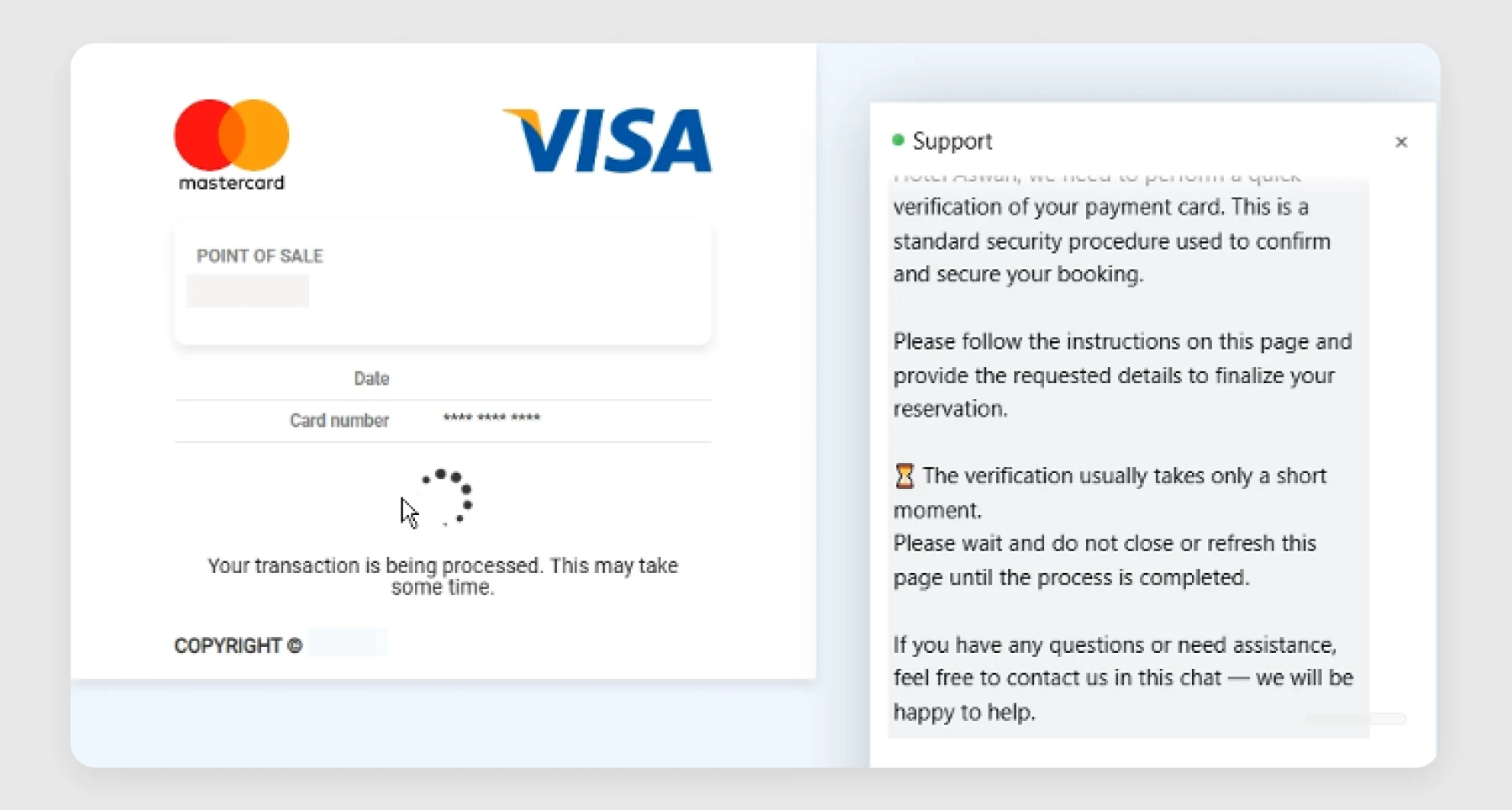
As the fake payment appeared to process, the site displayed automated support messages in a live-chat window (see Figure 2). That feature did two things: It gave targets a familiar trust signal, and it let attackers add polished support text at scale.

Your Action Plan
AI-scaled phishing is a speed-and-volume problem. Adversaries can localize lures and rotate fresh infrastructure faster than human-paced triage can respond. Organizations need agentic workflows, automated analysis and response, and continuous threat intelligence to keep pace. Tools like GreyMatter Phishing Analyzer can automatically and holistically detect, investigate, and contain phishing attempts that bypass secure email gateways and land in user inboxes.
- Block newly registered, uncategorized, and lookalike domains at the DNS and secure web gateway layers to stop disposable phishing sites from reaching users.
- Update awareness training to remove false trust signals. Polished language, realistic branding, and live chat don't prove a site is legitimate; users need to verify the destination and the workflow.
- Reduce the value of stolen credentials with phishing-resistant MFA, short session lifetimes, and conditional access policies that force reauthentication when risk signals appear.
Detect AI-Scaled Phishing Before a Lure Turns Into Fraud or Account Abuse
AI gives attackers more convincing lures and lets them deliver them at greater volume and pace. That means defenders should focus less on whether a phishing page "looks AI-made" and more on catching what slips through, identifying campaign patterns early, and spotting the fraud or account abuse that can follow. GreyMatter customers can use detections like the following to identify phishing that slips past preventive controls, expose attacker infrastructure, and surface the high-volume delivery patterns these campaigns rely on.
- Allowed Phishing Email: Detects phishing emails that were delivered to a user inbox rather than blocked by the email gateway. This is especially useful in AI-scaled phishing campaigns, where more polished language and better-themed lures can reduce the effectiveness of signature-, sandbox-, or reputation-based controls.
- Inbound Email Wave Detected: Detects a high volume of inbound emails from the same sender or campaign in a short period of time. This helps surface the scale advantage behind AI-assisted phishing operations, where attackers can generate and deliver large numbers of polished lures in a short period.
- Suspicious AiTM Phishing: Detects suspicious activity consistent with adversary-in-the-middle (AiTM) phishing, where attackers intercept authentication flows to capture credentials and bypass MFA. This detection provides coverage for phishing campaigns that escalate from convincing lure delivery into active account compromise.
AI in Malicious Tooling and Code Generation
AI is also showing up in malicious code in two main ways: generating functional components such as web shells and credential harvesters, and varying or padding code to frustrate static analysis. When code is regenerated for each target or deployment, payloads can be byte-unique even when the behavior stays the same. That weakens signature- and hash-based detection and puts more weight on behavioral and runtime controls. It also changes how defenders should read code: polished formatting, clear structure, and heavy commenting are also now signs of AI-assisted code generation and should not lower response urgency.
Across the samples we reviewed, one pattern that appeared repeatedly was commentary that overexplained obvious logic. On its own, that’s a weak signal. Low-skill attackers have always left amateur-looking code with awkward comments, and some operators even leave comments intentionally in shared tooling. But what makes AI the better fit here is the consistency and style of comments across otherwise different tools and contexts. The comments read less like operational notes and more like teaching-style annotations that narrate each line or block in plain language, which adds little value to someone who already understands the code.
That pattern was visible in a credential harvester likely tied to financially motivated extortion group “ShinyHunters.” The code walked through simple logic with explanatory comments in a way that felt more like generated scaffolding than working attacker notes. Even the emojis pointed in the same direction. Although none of that is proof of AI use by itself, it adds weight when combined with the comment style and overall structure (see Figure 3).
// Simple browser detection
if (/Edg\//.test(ua)) browser = "🟦 Edge";
else if (/Chrome\//.test(ua)) browser = "🌐 Chrome";
else if (/Firefox\//.test(ua)) browser = "🦊 Firefox";
else if (/Safari\//.test(ua) && !/Chrome\//.test(ua)) browser = "🍏 Safari";
else if (/OPR\//.test(ua)) browser = "🟠 Opera";
We saw the same pattern in a fully featured web shell with file management, terminal access, and authentication. Comments such as // Initialize panel visibility and // Check authentication didn't add operational value; they simply restated what the code was already doing (see Figure 4). In a tool this complete, that kind of narration looks less like collaboration and more like mode-generated scaffolding left in place.
// Initialize panel visibility
pnlLogin.Visible = false;
pnlMainMenu.Visible = false;
pnlFileManager.Visible = false;
pnlTerminal.Visible = false;
// Check authentication
if (!_q976)
{
    // Show login panel when not authenticated
    pnlLogin.Visible = true;
    return;
}
// User is authenticated, proceed with normal flow
if (!IsPostBack)
{
    ActivePanel = "MainMenu";
    _tmu();
}
else
{
    // Restore the active panel on PostBack
    RestoreActivePanel();
}
A leaner version of the same pattern appeared in a SAP NetWeaver web shell deployed after the ReliaQuest-discovered zero-day vulnerability CVE-2025-31324. The shell itself was only a few lines long — built to take a command parameter, run it, and print the output. Even so, it still included comments like // Combine error and standard output and // Read the output. In code that short and disposable, explanatory comments like that add almost no operational value.
AI-Assisted Tooling Meets Established Automation
The code only tells part of the story. In the SAP NetWeaver incidents, AI may have reduced the effort needed to produce the web shells, but automation handled deployment and the earliest post-exploitation steps at speed. This is a useful model for how AI is being applied in real intrusions today — not to replace the rest of the attack chain, but to feed it.
While scripted deployment, repeatable reconnaissance, and identical command sequences have long been part of attacker tradecraft, what makes these incidents relevant here is the combination of code that appeared consistent with rapid, possibly AI-assisted generation, followed by deployment and reconnaissance patterns that were clearly automated.
Once attackers have a workable shell, automation can distribute it across multiple hosts, randomize filenames, and trigger the same reconnaissance playbook almost immediately. That shortens the gap between exploitation and follow-on activity while leaving defenders with fewer stable payload artifacts to anchor on.
Across multiple SAP NetWeaver incidents, ReliaQuest observed patterns that are difficult to reconcile with manual, host-by-host activity:
- Identical payloads with randomized filenames. In one incident, every JSP web shell deployed had a random eight-character filename, but all shared the same source code.
- Multi-host deployment in compressed timeframes. In separate incidents, the same web shell was dropped on six to eight hosts within hours, all to the same SAP directory path structure. Only the host-specific SAP system identifier changed.
- Upload-to-execution gaps as short as one minute. On one host, only 60 seconds passed between the web-shell upload and the first discovery commands. At that speed, and across multiple systems, manual pivoting is unlikely.
- Identical reconnaissance sequences across every host. The same discovery commands (
whoami,nltest /domain_trusts,net group "domain admins" /dom, and others) ran in the same order on each compromised system. This behavior is far more consistent with automated or scripted reconnaissance than live typing.
Taken together, these patterns show how AI-assisted tooling can slot directly into automated workflows that attackers already use. If attackers can generate functional web shells faster and with less effort, automated deployment and reconnaissance do the rest. And for defenders, that leaves very little time between exploitation and follow-on activity.
Your Action Plan
When AI-assisted tooling feeds established automation, signatures, hashes, and static scanning lose much of their value. Focus instead on the deployment and reconnaissance patterns that stay consistent even when payloads are regenerated, renamed, or rapidly redeployed.
- Harden internet-facing application servers by restricting file uploads to web-accessible directories, alerting on new executables in application paths, and patching exposed systems aggressively. In the SAP NetWeaver cases, the path from upload to domain reconnaissance was measured in minutes, which leaves little room for reactive defense.
- Implement file-integrity monitoring and real-time alerting on new or modified files in web-accessible directories of internet-facing applications, especially when multiple files with randomized names appear in a short window to catch the automated deployment workflow AI enables, even if each individual payload evades static analysis.
- Automate containment actions, such as isolating the affected host as soon as a web shell is detected. When the gap between web-shell upload and first execution is measured in minutes, automation is the only response fast enough to materially reduce impact.
Disrupt AI-Assisted Malicious Tools with Automated Response
AI may explain how the tools were produced or polished, but defenders don't need a separate response for "AI attacks." The priority is the same as in any fast-moving compromise: Contain the affected host, cut off attacker infrastructure, and revoke any access the attacker may already be using. GreyMatter customers can use Automated Response Playbooks to contain threats at the speed these campaigns now demand.
- Isolate Host: Quarantine a compromised server or endpoint as soon as malicious tools or early post-compromise activity are detected, including web-shell execution, suspicious script activity, or rapid reconnaissance. This helps stop lateral movement and follow-on activity.
- Block Domain: Cut off attacker-controlled infrastructure linked to payload staging, credential harvesting, or command-and-control (C2) infrastructure. Domain-level blocking is especially useful where infrastructure is reused across multiple lures, hosts, or delivery stages.
- Terminate Sessions: Revoke active sessions tied to compromised accounts to stop attacker access immediately. This is particularly valuable where malicious tooling is used to harvest credentials or where attackers move quickly from initial compromise into authenticated activity.
AI in Identity-Themed Social Engineering
Typos, awkward phrasing, and poor grammar, and clumsy design used to be reliable tells. AI has erased them: Attackers can now generate polished text, cleaner interfaces, and more convincing voice scripts across languages with far less effort across phone, web, and identity workflows at once. As those cues lose value, the more durable defense is to harden the approval and authentication paths these campaigns are trying to exploit.
That matters most when credibility is the attack path.
ShinyHunters is a useful example, not because the campaign is end-to-end AI-driven, but because it shows how AI fits into a broader social-engineering workflow. The group's model typically runs on a vishing call that establishes trust, a branded landing page that sustains it, and an authentication or OAuth approval step that converts that trust into access. At each point, AI makes the lure more fluent, more convincing, and easier to tailor.
The strongest AI relevance is on the human-facing side of the campaign. Reporting suggests operators have used commercial voice-agent platforms that adapt conversational scripts in real time based on a target's responses, helping scale vishing without losing credibility.1 Even when AI use can't be proven in every call or page, the pattern is consistent with the role AI is playing elsewhere in this report, that is, producing and repeating the parts that depend on language, polish, and responsiveness.
The infrastructure matters too.
ReliaQuest has tracked clusters of identity-themed domains spun up daily to host these pages, often using single sign-on (SSO), login, and passkey language that blends in with familiar enterprise tools. The AI link here is less about registering the domains and more about what comes next. Once the infrastructure exists, AI can quickly fill it with polished, target-specific copy, branded login text, and supporting social-engineering content that make each page convincing with little manual effort.
ShinyHunters has also been moving the target brand into the subdomain rather than the registered domain — for example, <organization>.sso[.]guide, <organization>.okta[.]guide, or <organization>.passkey[.]com. Many monitoring programs miss these because they focus on the registered domain. Whether those hostnames are AI-generated or scripted, the result is still cheap, high-volume, victim-branded infrastructure that makes social engineering more convincing at scale.
Your Action Plan
AI-polished social engineering works best when credibility is the attack path, such as over the phone, on branded landing pages, and in authentication or approval flows that look legitimate. As those surfaces become more convincing, defenders should rely less on users spotting flaws and more on hardening the workflows that convert trust into access.
- Train end users to verify unsolicited IT or help-desk calls through an independent channel before entering credentials, approving MFA prompts, or authorizing app consent. Make that verification step simple and well known—for example, have users hang up and call IT back on a trusted internal number.
- Restrict OAuth and third-party application consent in SaaS platforms by disabling user-level consent and routing all app approvals through admin review and an allowlist. This stops a polished social-engineering flow from ending in persistent, token-based access.
- Roll out FIDO2 passkeys for privileged users and high-value SaaS apps where password-based login flows are still exposed to phishing. When attackers can create convincing branded pages on lookalike subdomains, the stronger control is authentication that won’t work on the wrong domain.
Detect Identity Abuse Triggered by Social Engineering
Defenders shouldn’t build detections around whether a call script, landing page, or message looks AI-generated. The priority is to catch the point where social engineering turns trust into access or data loss—suspicious communication activity, risky identity changes, and early signs that a compromised account is in use. GreyMatter customers can use detections such as:
- MFA Registration from Abused ASN: Detects new MFA registrations from IP addresses tied to commonly abused Autonomous System Numbers (ASNs), a common sign an attacker is trying to make access stick.
- Mass Sensitive Data Downloads: Detects bursts of sensitive-file downloads from SaaS applications. In campaigns like those linked to ShinyHunters, this can help identify when socially engineered access is being converted into rapid data collection or exfiltration.
- File Permission Application Granted to User - O365: Detects OAuth consent in Microsoft 365 that grants file access, especially relevant when a campaign ends in app approval rather than credential theft, giving attackers persistent, token-based access that bypasses MFA.