Editor's note: This report was authored by Raigridas Bartkus, Timothy McCann, and Matthew Doyle.
This is external threat intelligence from the ReliaQuest Threat Research team. The findings describe threats, vulnerabilities, and attacker activity affecting third parties and the broader threat landscape—not ReliaQuest's own environment. Nothing in this report should be interpreted as a vulnerability in ReliaQuest's systems or data.
Key Points
ReliaQuest has identified a new toolkit, dubbed “Gryxa,” used by a financially motivated threat actor across 324 listed hosts. We assess that substantial portions were almost certainly built with a commercial AI coding agent, which appears as co-author on most commits in the actor's public repository. This marks the first time ReliaQuest has observed a threat actor use AI to help build and execute an entire operation to this extent.
After defenders remove the visible remote monitoring and management (RMM) implant, a surviving Gryxa component collects Windows logs and host artifacts and uploads them to the threat actor, so the attacker effectively sees the remediation.
Partial containment triggers countermeasures. If the actor's relay becomes unreachable, Gryxa attempts to disable and uninstall any endpoint protection agent within roughly 10 minutes.
Contain in the right order: Block the actor's infrastructure first, then remove every persistence mechanism in one pass.
ReliaQuest has identified a new toolkit, referred to in its related public code repository as “Gryxa.” The toolkit is highly likely used by a financially motivated threat actor to run an initial-access operation. We assess with high confidence that the actor developed substantial portions of Gryxa with the help of an AI coding agent, since most commits in the actor’s public code repository carry AI co-author metadata.
Until now, threat actors’ use of AI has focused on scaling their operations or executing individual tasks like writing commands or sorting through stolen data. Gryxa, however, is the first case we’ve observed where AI has helped build the entire operation, from the toolkit to the console the actor runs it from. And for the broader landscape, this likely sets a precedence for more attacks of this nature.
Gryxa turns legitimate remote monitoring and management (RMM) software into covert access, keeps the access alive through several restart mechanisms that operate independently of each other, and then steals credentials saved in Chromium-based browsers. It also escalates against endpoint protection when the connection to the actor is interrupted, disabling or attempting to uninstall the security agent. Together, these capabilities give the actor durable access to a host and allow them to steal cryptocurrency wallets.
Gryxa’s most distinctive capability is how it responds to remediation. When defenders remove the RMM implant, another component of Gryxa collects local records describing how that removal was carried out and sends them to the threat actor. We haven’t seen this documented for other actors abusing RMM software.
Analyzing the source code in their public repository, we identified that the actor manages compromised hosts through a web console, which listed 324 hosts with 69 reporting as online at the time of writing. The host we investigated appeared in that list, which connects the repository and its supporting infrastructure to the activity we observed.
Read on to learn:
What Gryxa collected after defenders removed the visible RMM implant
What evidence in the actor’s repository points to AI-assisted development
Why the toolkit persists even when the visible RMM client has been removed
Gryxa Likely Built Using a Jailbroken AI Model
We assess that the actor almost certainly developed substantial portions of Gryxa using a commercial jailbroken AI coding agent, which likely allowed one person to build and operate an entire toolkit, a management console, and a signed update pipeline across several hundred hosts. We make this assessment as we observed the AI agent appearing as a co-author in the majority of commits in the actor’s own public repository. We expect more single operators to start building and running infrastructure at this scale, which makes behavior-based detection more durable than tracking individual toolkits.
Evidence of AI Assistance
Our assessment rests on the actor’s public code repository and infrastructure, which we analyzed directly. Four observations support it, ordered from strongest to weakest:
Repository metadata records a commercial AI coding agent as co-author in the majority of commits. It’s the strongest evidence available, and anyone can observe it directly in the repository.
The repository contains a rules file that’s automatically supplied to the AI agent in every session, written as engineering guidance. The guidance includes what to avoid, what to verify, which failure modes recur. Alongside it, the actor keeps session handover notes in
SESSION_HANDOFF.mdand 35 numbered case write-ups inCASES.mdanalyzing their own failed installs. Later commits address the specific problems those entries describe, which indicates an iterative development cycle rather than a single generated output.Approximately one hour elapsed between the first repository reference to Chrome App-Bound Encryption (a feature that protects saved browser passwords) and a commit containing code intended to bypass it. This reflects repository activity only. It doesn’t show how long the actor worked on the problem, and we haven’t independently verified that the code succeeded.
The actor’s relay infrastructure serves near-identical landing pages whose structure and wording resemble AI-generated content rather than hand-written pages.
It’s also a realistic possibility the same approach produced parts of the supporting infrastructure.
What’s significant here is that one person likely sustained a workload that would previously have suggested a small team. That doesn’t make the toolkit unsophisticated—its persistence and recovery engineering are extensive—but the barrier to building at this level has fallen, so defenders must plan for more actors rather than more advanced ones.
How the Actor Bypassed the AI Model Safeguards
Two scripts in the repository carry an identical comment in their header blocks. In own_lib.ps1 and own_mon.cmd, immediately after the version notes, the actor wrote: “Authorized internal deployment - lab/competition scope only.” But neither script is a lab tool. own_lib.ps1 provides per-host identity handling, a Windows Management Instrumentation (WMI) watchdog, and service repair for the persistence layer; while own_mon.cmd is the monitoring component that pins the fleet update channel.

It’s likely that the actor used this framing to present the work to the AI coding agent as authorized lab testing rather than malware development. The rest of the repository reads the same way, describing the work in the vocabulary of legitimate systems administration, such as installer readiness, service recovery, scheduled-task configuration, and staged rollout to groups of machines.
We don’t have the actor’s prompts or session transcripts, so we can’t establish what was said to the agent, whether any safeguards refused a request, or what the agent produced before and after. But what we can say is that the committed code carries an explicit authorized-testing claim that is false.
The practical point for defenders is that this framing costs an actor nothing. A comment line asserting authorized scope takes seconds to add, and it may be enough to obtain help with writing code that has no legitimate application.
Gryxa Creates Persistent Access and Steals Credentials
Gryxa combines limited concealment with extensive recovery mechanisms, which suggests the actor prioritized restoring access after disruption over staying undetected. Throughout this section we separate behavior we observed in the investigated environment from the capabilities we read in the actor’s code but didn’t see execute.
Initial Access and Execution
The toolkit was likely delivered via phishing, based on our observation of a 19MB self-extracting executable with an invoice-themed filename and a randomized numeric suffix, in the pattern invoice_<10 digits>.exe. We didn’t observe the delivery itself, so this is just one likely route rather than a confirmed one.
The installer retrieves the remaining components over HTTPS. Individual components use different sources: Some fetch from the actor’s own server first and fall back to a public code-hosting service, while others go to the code-hosting service directly. The download commands skip over checking the revocation of the Transport Layer Security (TLS) certificate, so revoking the certificate that a delivery host presents won’t stop retrieval on its own. Other certificate validation still applies, and network-level blocking still works.
The toolkit spreads its files across four locations: A primary WinRTCS directory, two directories chosen to pass as Windows error reporting and diagnostics paths, and an off-path copy of its files. All are marked hidden, so they won’t appear in a default file listing, though a responder who turns on hidden items will see them. The folders we found were:
|
Persistence Built to Survive Partial Removal
Persistence is where the toolkit invests most heavily. Deleting any single Gryxa artifact achieves little, because the remaining components restore it. This is why the partial removal we saw in our investigations resulted in the toolkit returning. We identified at least seven scheduled tasks across two layers, a Windows event subscription, and a redundant copy of the toolkit’s files:
Three WinRTCS scheduled tasks running as SYSTEM at one-, five- and fifteen-minute intervals. Each runs a script that recreates the full set, so a deleted task is typically back within a minute.
A further four scheduled tasks belonging to the keeper layer, registered under names that resemble legitimate Microsoft tasks. Two run in one-minute intervals, one triggers at system start, and one at user logon.
A permanent WMI event subscription, which persists across reboots and survives deletion of the scheduled tasks.
A copy of the toolkit’s files staged outside the main install directory. This is redundant storage rather than an execution mechanism, but it’s what the other components draw on to rebuild.
The scheduled tasks and the WMI subscription restore execution, and both draw on the off-path file copy to replace anything a responder deleted. Removing the visible RMM client and the primary directory therefore leaves a working restore path. Treat removal as complete only once you’ve accounted for all three persistence categories and the off-path file copy, or once the host is re-imaged.
Partial Containment Triggers Gryxa to Remove Endpoint Protection
This behavior is the one most likely to catch a responder off-guard, because the trigger is the defender’s own action rather than any detection. Gryxa keeps a counter on disk that increments each time its guard component runs and finds the actor’s relay unreachable. The guard runs every five minutes.
At two consecutive failures the toolkit disables Microsoft Defender and issues service stop and disable commands against EDR products from a hard-coded list. At three, it reads the uninstall string for the security agent from the registry and runs a silent uninstall. This means cutting the actor’s remote-access service without simultaneously removing the scheduled tasks, and the file cache can lead to endpoint protection being disabled and uninstalled in roughly 10–13 minutes.
The toolkit re-enables Defender once its relay is healthy again, so a healthy Defender status isn’t evidence that nothing happened. What’s more, the Defender exclusions it adds are never reverted.
Cutting the visible service on its own is what starts the countermeasure, because the toolkit reads the lost connection as a signal to fight back. That’s why order matters here. Block the actor’s infrastructure first, then remove the service, the scheduled tasks, and the working folders together in one pass. If your endpoint agent supports Uninstall Protection, turn it on as it blocks the final stage. Without it, an actor with SYSTEM-level access can remove the agent entirely.
Gryxa Bypasses Chromium Protection to Steal Credentials
Gryxa targets credentials saved in Chromium-based browsers. On Windows, Chrome App-Bound Encryption protects those credentials by tying the encryption key to the browser itself—a control Google introduced in 2024 to stop other processes decrypting them. Other Chromium-based browsers vary in what protection they apply, and we haven’t tested Gryxa against each of them. The toolkit also retains an older decryption method, so it can read credentials from profiles where App-Bound Encryption is not in use.
The credential module contains three decryption routes described in code as working against App-Bound Encryption. All three require local code execution on the host:
Borrowing the security context of a trusted Windows process, which requires elevated privileges.
Calling the browser’s own privileged elevation service to perform the decryption, which requires local execution alongside the browser installation.
Requesting the browser’s protected key from the Windows key store in the context of the user who owns the profile.
The module also contains a legacy path for hard-coded fallback keys, but those apply to one specific key format rather than to App-Bound Encryption generally, so they aren’t a universal bypass. Retaining that older path alongside the newer ones means the module works against both current and older browser versions. We confirmed these paths in code review but didn’t independently verify successful decryption against every browser version the component lists.
The credential module treats exchange logins and wallet extensions differently. Decrypted logins are checked against roughly 40 cryptocurrency exchange and financial-technology domains, and any match is sent to the actor with the username, password, and host details.
For wallet browser extensions it records only that they’re installed, checking around 69 extension identifiers without extracting wallet contents. The console flags those hosts, and the actor's case notes indicate an operator then returns over the remote-access session to access the wallets manually.
Credentials leave the host through Telegram rather than the toolkit’s own command-and-control (C2) channel, sent as plaintext in the message body. Three separate bots all deliver to the same chat identifier: One receives stolen credentials, one receives fleet and host status from the reporting module, and one receives operations-tier alerts from the actor’s server. All three report to a single personal account, which is consistent with our single-operator assessment.
On any host where the credential module ran, treat every credential saved in an accessible browser profile as exposed. The module decrypts everything it can reach before checking the results against its target list, so a corporate login in the same profile has already been read even if the actor discarded it. Rotate those credentials on the assumption the actor holds them, and check what each account could reach.
Gryxa Collects Evidence of How Defenders Remove Its Access
During our investigation, we observed that defenders removed the visible RMM implant, but a second Gryxa component stayed operational, and the toolkit returned within seven days. That component collected Windows logs and host artifacts and uploaded them to actor-controlled infrastructure. It’s the behavior we consider most consequential in this campaign, as the details of a response can end up in the attacker’s hands and shape their next attempt.
Partial Removal Leaves Gryxa Behind and Exposes the Response
A partial removal carries a second cost beyond leaving Gryxa in place: It makes your response visible to the actor.
After the RMM implant was removed, a surviving Gryxa component collected a specific set of records: the scheduled tasks and Windows event subscriptions present on the host; Windows installer and service-control logs showing what was installed or stopped and under which account; process-creation logs showing what was executed; an inventory of every remote-access tool on the machine with its version and connection state; and a check of whether its own channel to the actor still worked. It packaged these into an archive and uploaded it over an authenticated connection. Together, those records could reveal the tools and accounts a responder used.
The Gryxa component only gathered and uploaded; it didn’t examine what it took. The actor draws any conclusion about which tool performed the removal, which account ran it, and in what order after receiving the archive. The actor's console includes a ready-made job named collect-forensics, which indicates this is a routine capability rather than a response to one incident. Gryxa rotates its log files when they exceed 200KB, meaning recent activity is preserved for a responder who acts quickly.
Gryxa’s Control Infrastructure and Defensive Response
Gryxa’s centralized management and update architecture allows the actor to issue jobs across the fleet and replace toolkit components rapidly. This reduces the useful life of file-hash indicators and means that disrupting one server may not sever access while fallback infrastructure remains available. We identified the console from source code in the actor’s public repository rather than by accessing a live panel. It shows the actor how many hosts are compromised, which are live, and the status of queued tasks, and it can push a job to selected hosts or to the whole fleet. At the time of our analysis it listed 324 hosts, 69 of them reporting as live. Not every listed host is necessarily a confirmed victim.
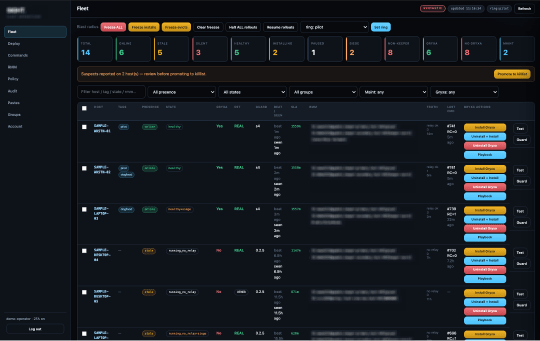
The toolkit updates itself. On each cycle it checks an integrity manifest of expected file hashes and pulls down any component that has changed, including the agent, the persistence components and the credential-theft module. One commit therefore changes the files on every host that checks in, so treat file hashes from a single incident as short-lived and prioritize behavior-based detection.
Gryxa’s code anticipates other remote-access tools on the same host. It stops and uninstalls named rival services, removes RMM installations whose installer fingerprint does not match the actor’s own, and deletes associated scheduled tasks and WMI subscriptions. It avoids the standard Windows uninstaller for competing RMM clients, which the actor’s own notes attribute to those clients sharing a product identifier with theirs.
This code doesn’t establish that other actors were on the hosts we investigated. It could reflect competition for previously compromised machines, a shared access source, or an attempt to keep legitimate administrators from regaining control. Either way, two things follow for defenders. A host running Gryxa may carry traces of other tools being removed, so the absence of a second actor isn’t evidence that none was present. And a legitimate RMM instance that doesn’t match the actor’s expected fingerprint may be uninstalled, so the implant could remove a tool you deployed to remediate the host.
So don’t deploy your own remote-access tool onto a live Gryxa host—the implant won’t recognize it and will likely uninstall it. Contain the host first, in the order set out above, and bring your own tools in only once it’s clean.
Step Up Your Defenses Against Gryxa
ReliaQuest’s Approach
GreyMatter Attack: Safely test the behaviors in this report against your environment to confirm whether you detect SYSTEM-level scheduled task creation and WMI event subscription persistence. That surfaces visibility and detection gaps before this behavior shows up in an intrusion.
GreyMatter Agentic AI: Correlates behaviors across an intrusion that look low confidence in isolation. An RMM client connecting to an unrecognized destination, a SYSTEM-level scheduled task created alongside a WMI event subscription, and registry writes to Defender policy paths each look weak alone. But correlated at machine speed, they describe an active compromise well inside the interval in which this toolkit rebuilds itself.
GreyMatter Transit: Provides visibility into network telemetry while it’s still in motion. Gryxa restores a deleted component within roughly a minute, so any time a detection spends waiting on log ingestion is time the toolkit uses to rebuild. Removing that delay is what lands containment inside the window.
ReliaQuest Detection Rules: We continuously update these rules using the latest threat intelligence and research. To defend against the Gryxa behaviors detailed in this report, we recommend the following rules:
The following GreyMatter Automated Response Playbooks act on the detections above:
Isolate Endpoint: Removes the host from the network, cutting the control channel before the operator can issue further commands or the toolkit can re-fetch components.
Ban Hash: Prevents reinfection from the toolkit components identified in this report, noting that signed updates allow the operator to rotate hashes between campaigns.
Terminate Sessions: Invalidates active sessions on hosts where browser-stored credentials may have been decrypted, provided the identity falls within directory coverage.
Your Action Plan
These recommendations each address a gap this activity exposed:
Contain in the right order: Gryxa escalates against endpoint protection when it loses contact with the actor, so removing the visible service on its own starts a clock. Block the actor’s infrastructure by IP address at the network edge first, then remove the service, all seven scheduled tasks, the event subscription, and every working folder together in one pass. Don’t deploy your own remote-access tool until the host is clean, because the implant won’t recognize it and may uninstall it. Turn on Uninstall Protection if your endpoint agent supports it.
Account for every persistence mechanism before returning a host to production: This includes three scheduled tasks belonging to the toolkit itself, four more registered under names resembling legitimate Microsoft tasks, the Windows event subscription with its filter and consumer, and every working folder—including the backup copy of the toolkit’s files staged outside the main install path. That backup copy is what the other mechanisms rebuild from, so leaving it behind undoes the rest of the work.
Don’t treat a healthy AV state as evidence of a clean host: This toolkit restores Defender once the implant is confirmed running, which removes the signal a persistently disabled antivirus (AV) tool would otherwise create. Check Defender exclusion paths and Group Policy overrides directly.
Establish which identities sit outside directory coverage: Those identities are the accounts that identity-side response actions can’t reach, and unmanaged devices are where that gap usually appears.
Key Takeaways and What’s Next
We assess with high confidence that the actor developed the Gryxa toolkit, its management console, and its update pipeline with substantial help from an AI coding agent. Building and operating these elements across several hundred hosts has, until now, implied either real development experience or a team of people, yet this actor seemingly had neither. Two of the committed scripts carry a comment falsely claiming the work was authorized lab or competition testing, which appears to be how the actor obtained the agent's help.
The significance of this case extends beyond this specific toolkit, and we assess it’s likely that more operations of this scale, run by actors with limited development experience, will emerge over the next 12 months. What’s more, this is a real-world example of how AI lowers the skill barrier required to build something of this standard, which points defenders toward behavior-based detection rather than tracking individual toolkits.
Gryxa arranges persistence across at least seven scheduled tasks in two layers, a permanent Windows event subscription, and a redundant copy of its files outside the install directory. Removing the visible RMM client alone doesn’t evict it and actively triggers escalation against endpoint protection. However, that resilience wasn’t necessarily designed intentionally: The repository included 35 numbered write-ups of the actor's own failed installs, with later commits—made with the AI agent’s help—fixing the specific problems each one described. This demonstrates an iterative cycle, worked through with the AI coding agent, to turn repeated failure into a toolkit built to survive partial removal. In this case, AI not only made this attack easier to build, but it also made the toolkit harder to remove.
A surviving Gryxa component collected Windows logs and host artifacts after the RMM client was removed and uploaded them to actor-controlled infrastructure. Those records could reveal the tools and account a responder used. Where a toolkit is built to recover from disruption, defenders should assume that the threat actor has observed the response actions to it.
During our investigation, we observed that the compromised account didn’t exist in the organization’s directory because the device sat outside centralized management, so revoking sessions and rotating credentials had nothing to act on. Every organization with contractors, advisers, or personally owned devices reaching corporate resources has some population that sits outside that boundary. Gryxa is built to rebuild itself faster than manual remediation completes, so on a host in that population the actor has time on their side.
IOCs
Artifact | Details |
|---|---|
wirbe[.]com | Actor-controlled domain |
world.wirbe[.]com | Actor-controlled domain |
cdn.wirbe[.]com | Actor-controlled domain |
ver.wirbe[.]com | Actor-controlled domain |
mesh.wirbe[.]com | Actor-controlled domain |
seczio[.]com | Actor-controlled domain, legacy infrastructure still in use |
debian.seczio[.]com | Actor-controlled domain, legacy infrastructure still in use |
gryxa[.]com | Actor-controlled domain, legacy infrastructure still in use |
ui.gryxa[.]com | Actor-controlled domain, legacy infrastructure still in use |
update.gryxa[.]com | Actor-controlled domain, legacy infrastructure still in use |
sevrz[.]com | Actor-controlled domain, legacy infrastructure still in use |
ui.sevrz[.]com | Actor-controlled domain, legacy infrastructure still in use |
update.sevrz[.]com | Actor-controlled domain, legacy infrastructure still in use |
144.172.107[.]56 | IP address of actor-controlled infrastructure |
209.145.55[.]189 | IP address of actor-controlled infrastructure |