Skip to Content

In This Guide:

  • Automated Playbooks for Phishing Threats

  • 5 Questions to Gauge Automation Risk

  • Ways to Apply Automation Across the TDIR Lifecycle

  • How to Build Automation Confidence

  • Best Practices for Safely Applying Automation

  • When to Take the Agentic AI Next Step

Attackers automate initial access, movement, and encryption across multiple targets. Your security team must match their pace—or risk significant compromise. The average attacker reaches lateral movement in just 18 minutes. In one recent incident, Akira ransomware operators initiated lateral movement within 6 minutes of compromising a SonicWall VPN. Another completed encryption operations in 19 minutes.

Meanwhile, organizations relying on manual detection and response processes are typically still gathering initial incident data at that 6-to-18-minute mark.

Build Automation You Trust | Content and Media - Image | Closing the Gap Image

When attackers can establish persistence faster than your team can detect them, the math becomes impossible to ignore. Your security needs automation.

This guide provides a framework to automate strategically: knowing what to automate, when to automate it, and how to stay in control while building speed. Because at 18-minute breakout times (or faster), manual response isn't just slow. It's obsolete.

Automating Cybersecurity Playbooks

A cybersecurity playbook serves as the foundation for a well-prepared security operations team, comprising a set of guidelines, procedures, and best practices meticulously designed to respond effectively. Automating these playbooks elevates your capacity to respond quickly, consistently, and efficiently.

Automated Playbook: Phishing Link Clicked

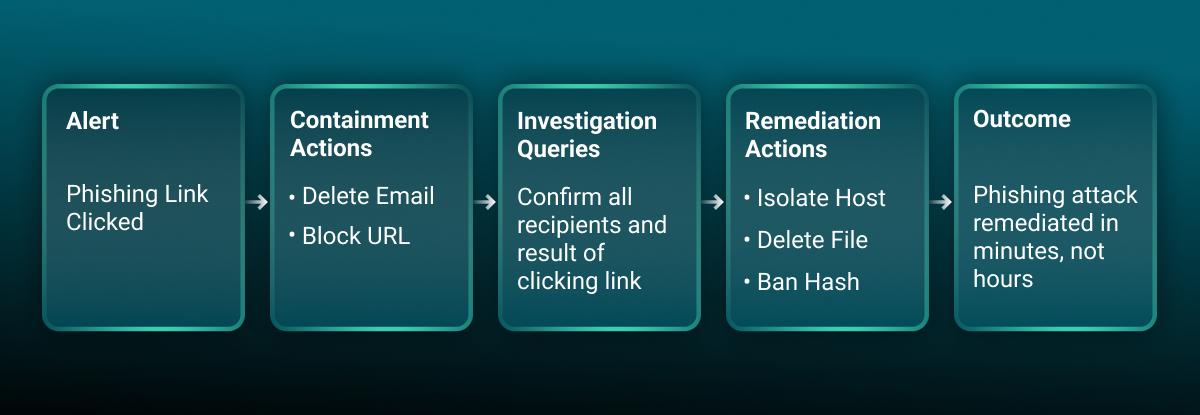
Phishing is a top attack vector, which means it’s critical to respond as fast as possible when a phishing detection fires. Security teams can respond faster by implementing automations that can analyze user-reported emails and respond to clicks in seconds. Here’s what an automated playbook might look like for a common phishing detection—Phishing Link Clicked—broken out into actions for containment, investigation, and response.


Practical Guide to Automation | Content and Media - Image | Sequence Diagram

Automated Actions for Phishing Threat Containment

When a user clicks a phishing link, containment is the critical first step. The automated actions below quickly stop attackers from advancing their attack.

Automated Action

Why?

Ways to Minimize Risk

Temporarily lock user account

Prevent unauthorized access

Create “allowlist” for high-ranking positions.

Block phishing URL/domain

Prevent other users accessing malicious site

Create “safelist” for legitimate business sites.

Execute password reset

Prevent compromised password misuse

Notify user automatically with clear instructions.

Isolate affected device/account

Prevent further network communication/malware spread

Isolate user devices only; list devices for non-business hours isolation.

Automated Actions for Phishing Threat Investigation

Automating phishing investigation expedites analysis, uncovering critical information for timely action. The queries below, commonly posed by human analysts, are prime candidates for platform-initiated automation after a detection. Ensure a clear grasp of technology and data sources before automating.

Query to Automate

Insight

Typical Data Source

Analyze phishing link/website content

Identify specific threat (e.g., credential harvesting)

Threat intel, URL sandbox

Check for credential submission

Determine potential data breaches

EDR, web proxy (form submissions)

Determine link access method

Gain insight into threat source for root cause

Email, EDR, social platform

Check if other users received link

Identify targeted vs. widespread campaign

Email security, EDR, web proxy

Automated Phishing Remediation

Focused on recovery and prevention, remediation removes phishing threats and restores systems. Automation accelerates this process, ensuring swift, consistent recovery. Actions can be platform- or human-initiated after threat confirmation.

Action

Description

Configuration Options to Further Minimize Risk

Initiate host scan

Determine malicious files/activity post-phishing

Notify impacted parties of potential performance issues.

Isolate affected systems

Prevent further malicious communication/malware spread

Only isolate confirmed links; align with risk tolerance; notify users.

Delete malicious file(s)

Prevent malware spread and host compromise

Notify impacted parties of potential performance issues.

Ban malicious file hash

Prevent others from interacting with the malware

Ensure hash matches malicious file.

This playbook provides a template for phishing, but how do you decide which actions to automate for other threats? The following framework provides a universal model for making those decisions safely.

Decision Framework: Identifying the Best Automations for Your Playbooks

Now that you've seen what's possible, here is a simple framework to identify low-risk, high-impact automation opportunities in your own environment.

Ask Yourself

Insight

Will this action stop the threat from spreading?

The goal is containment. The action should be an effective countermeasure that prevents further damage, not just a reactive step.

Does an analyst do this every time this detection triggers?

If a response is routine and consistent, it is a prime candidate for automation. This frees your team from repetitive, manual tasks.

Will this action disrupt critical business operations?

It’s crucial to choose initial actions that maintain business continuity. Avoid automating responses that could impact productivity or service delivery.

Does this align with our organization’s risk tolerance?

Automated actions must reflect your overall cybersecurity strategy and acceptable risk levels. Focus on what your organization is comfortable with.

Can this action be easily reversed or modified?

Flexibility is key. The ability to undo an automated action is vital if the initial detection turns out to be a false positive or circumstances change.

Applying the Framework

Applying this framework to common threats demonstrates its power. Let’s apply the framework to a key containment action: automatically quarantining a suspicious email. Why this action is a good candidate for automation?

  • It immediately stops the threat from spreading by preventing the user from interacting with the malicious email.

  • It is a routine action that analysts perform consistently for this type of alert.

  • The business disruption is minimal. Quarantining is less disruptive than permanent deletion and is easily reversible if the email is a false positive, aligning with a conservative risk tolerance.

Where Automation Creates the Most Value

Most security teams think about automation for response—the final step after an attack is confirmed. But automation opportunities exist across your entire security workflow. The real competitive advantage comes from automating detection first.

Detection: Fix Alert Noise First


What: Centralize detection rules across all SIEMs and EDRs. Automate data correlation to identify suspicious patterns. Integrate threat intelligence feeds to filter known-bad activity.

Impact: Instead of 100 fragmented alerts, analysts field a single correlated alert.

Investigation: Accelerate Analysis


What: Automatically execute standardized investigation queries. Enrich findings with threat intelligence and correlate with historical incidents. Finally, generate investigation summaries.

Impact: Investigation time shrinks from hours to minutes. Analysts make containment decisions based on complete context rather than hunting through multiple tools.

Response: Speed Containment


What: Deploy predefined playbooks for common threats. Execute multi-step procedures automatically across tools. Maintain an audit trail of all actions.

Impact: Mean time to contain reduced from hours to minutes. Consistent response every time, with no risk of human error.

Five Best Practices for Safe Automation

Automate what you know. Deep process knowledge is prerequisite. If you're still figuring out the response, don't automate it yet.

Start with high-fidelity alerts. Focus platform-initiated automation on detections consistently confirmed as threats (80%+ true-positive rate).

Favor reversibility. Soft-delete over permanent delete. Temporary lock over permanent disable. Design failures to have minimal impact.

Invest in risk mitigation configuration. Build allowlists to prevent blocking of legitimate addresses and safelists to protect critical systems. Configuration is where false positives become non-events.

Maintain human judgment. Automation handles routine cases (95% of incidents). Keep mechanisms for analyst override, exception handling, and creative responses to novel threats.

Getting Started

  1. Map your current state. Inventory tools, alert volume, analyst time spent. Establish baseline metrics.

  2. Define risk tolerance. Explicit conversation between security and business leadership about acceptable automation scope.

  3. Choose your platform. Prioritize SIEM/EDR integration capability over feature count. You need orchestration across existing tools, not replacement.

  4. Start with phishing. High-volume, clear detection, low-risk response. Build momentum with quick wins.

  5. Measure everything. Capture baseline before automation. Track metrics during rollout. Use metrics to guide optimization.

The False Positive Risk: Why 80% Confidence Matters

Reserve automatic actions (no approval) for detections with 80%+ true-positive rate. How do you get there?

  1. Start with known-bad intelligence. Threat feeds provide built-in confidence—these are IPs, domains, and file hashes already confirmed malicious by others. Automate quarantine for known-bad phishing URLs? Safe. Automate based on a behavioral pattern you've never seen before? Risky.

  2. Correlate alerts across tools to reduce noise. A single SIEM rule might fire 1,000 times per month with 95% false positives. Cross-reference that alert with EDR data, threat intelligence, and user behavior baselines? Now you're at 80%+ confidence.

  3. Gradually expand to behavioral detections. As you gain confidence in your baseline activity, introduce behavioral automations (unusual login patterns, lateral movement, data exfiltration attempts). Build this gradually, not overnight.

This is where platform-initiated automation decisions matter. Tools that automatically correlate across SIEM, EDR, and threat intelligence accelerate your path to 80% confidence. Otherwise, you’ll be stuck manually investigating low-confidence alerts.

Beyond Basic Automation: The Agentic AI Imperative

Foundational automation is the critical first step to streamlining tasks and providing immediate gains in security operations. However, in an adversarial landscape where attackers are leveraging AI to move faster and execute more sophisticated tasks, basic automation eventually reaches its limits. Once you’ve implemented automation, the next imperative is agentic AI—intelligent systems capable of true autonomy, perceiving their environment and independently making context-aware decisions and actions. These systems are highly adaptable, learning from experience, and evolving with dynamic conditions.

Where to Bring in Agentic AI

Where automation leans on static, predefined rules, Agentic AI learns from vast, dynamic datasets—observing patterns, behaviors, and evolving threat intelligence in real-time. This adaptive learning allows agentic AI to step in where rigid rules break down, providing intelligent solutions for challenges like:

<h5>Intelligent Alert Triage and Resolution</h5><p></p>
Intelligent Alert Triage and Resolution

Agentic AI autonomously prioritizes, enriches, and resolves incidents by correlating full context (user behavior, threat intelligence, system criticality).

<h3><b>Adaptive Threat Containment</b></h3><p></p>

Adaptive Threat Containment

Makes context-aware containment decisions, dynamically adjusting responses to adversary movements and environmental feedback for faster, more precise mitigation with minimal human oversight.

<h3><b>Proactive Vulnerability Prioritization</b></h3><p></p>

Proactive Vulnerability Prioritization

Continuously monitors the environment and global threat landscape, prioritizing vulnerabilities by real-world exploitability, asset criticality, and attack likelihood to focus teams on highest-risk exposures.

The Bottom Line

Automation and agentic AI do not replace human experts. They are powerful tools designed to free your team from repetitive, mundane tasks so they can focus on complex analysis, strategic threat hunting, and creative response to novel threats. Organizations achieving sub-5-minute MTTC aren't doing so with blind automation or by buying the first agentic AI platform they see. They’re applying these things in a threefold strategy:

  • Automation applies to high-confidence, reversible, well-understood processes.

  • Human judgment remains critical for lower-confidence, destructive, novel processes.

  • Agentic AI acts as a powerful augmentation rather than the sole-decision maker.

Start small. Measure carefully. Expand gradually. That's how you build sustainable automation that reduces risk while transforming your security operations.